Why Do My AirPods Keep Beeping? (And How to Stop It for Good)

If your sleek little earphones have started making unexpected beeps or chimes, don’t panic you’re not alone.
Many users experience that mysterious beep-beep sound coming from their earbuds, whether during music, calls, or even when they’re sitting quietly in the case. In this guide, we’ll break down Why Do My AirPods Keep Beeping, and how to fix it easily at home no tech degree required.

Quick Summary
If your wireless earbuds keep beeping, it’s often because of:
- Low battery or charging issues
- Bluetooth connection errors
- Software bugs or outdated firmware
- Moisture, dirt, or faulty sensors
- Incorrect settings for auto ear detection or notifications
By the end of this article, you’ll know how to stop the beeps, keep your music flowing smoothly, and prevent future interruptions.
Why Do My AirPods Keep Beeping When I Open Them?
You take out your earbuds, open the case and beep!
This tiny sound can mean several things:
a) Bluetooth Handshake Sound
When you open the lid, the buds try to connect automatically. That short beep signals that they’re waking up and pairing with your iPhone or other device.
If the sound happens only once and stops, it’s perfectly normal.
b) Firmware or Sync Error
Sometimes, your earphones struggle to sync between left and right buds. This can cause a quick beep-beep right after opening.
To fix it:
- Put both buds in the case.
- Wait 30 seconds.
- Reconnect from Bluetooth settings.
If that doesn’t help, reset your earbuds (we’ll explain how soon).
c) Battery Mismatch
When one earbud is low on power, it may chime during startup. Check the battery status on your phone or via the Bluetooth widget.
Keep both sides charged evenly for stable performance.
Why Do My AirPods Keep Beeping When Fully Charged?
You’d expect beeping for low battery, but why when they’re fully charged?

a) Firmware Glitch or Calibration Error
Sometimes, the battery percentage isn’t calibrated correctly. Your earbuds might “think” they’re at 100% when they’re actually fluctuating.
Try this:
- Drain both earbuds completely.
- Fully recharge them without interruption.
This recalibration helps the system read power levels accurately.
b) Charging Case Alert
Some models beep when the case lid opens or closes even when charged to signal readiness. This happens mostly in Apple AirPods Pro (2nd Generation) Wireless Ear Buds and Apple AirPods 4 Wireless Earbuds.
c) Notification Settings
If your phone sends sound alerts (for messages or calls) through connected audio devices, the buds might chime every time a new notification hits.
To fix it:
- Go to Settings → Notifications → Announce Notifications
- Turn off for earbuds.
Why Do My AirPods Keep Pausing?
If your music keeps stopping mid-beat, it’s often linked to sensors or connectivity.
a) Automatic Ear Detection
These smart sensors detect when your earbuds are in your ears. If they misread your position, playback can pause unexpectedly.
Fix: Turn off Automatic Ear Detection in Bluetooth settings.
b) Dirty Sensors or Moisture

Sweat or earwax can confuse the sensors. Clean your earbuds gently using a soft, dry cloth or cotton swab.
c) Loose Fit
If the ear tips don’t sit snugly, especially in Apple AirPods Pro 2 Wireless Earbuds or EarFun Air Pro 4 Adaptive Hybrid Noise Canceling Wireless Earbuds, they might misread that you’ve taken them out.
Try switching to different ear tips for a better fit.
d) Bluetooth Conflict
If multiple devices are nearby (like your iPad, MacBook, or smartwatch), your earbuds might constantly switch connections.
Fix: Forget unused devices or disable automatic switching.
How Do I Stop My AirPods from Chiming?
If you’re tired of the random ding! or beep!, you can silence it completely.
Step-by-Step Fix:
- Update Firmware:
Keep your earbuds connected to your iPhone and plugged in overnight. Apple pushes updates automatically. - Disable Automatic Announcements:
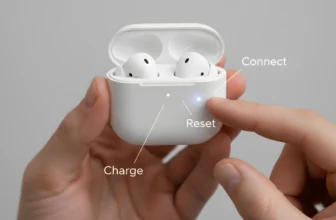
Go to Settings → Siri & Search → Announce Calls/Notifications and toggle it off. - Reset Your Earbuds:
- Put both buds in the case.
- Hold the setup button for 15 seconds.
- Reconnect manually via Bluetooth.
- Clean the Charging Contacts:
Dust and moisture inside the case can trigger false alerts. Use a microfiber cloth or air blower to clean carefully.
How Do I Get My AirPods to Stop Beeping Altogether?

If none of the above worked, here’s a full checklist:
- Check Bluetooth range: Stay within 10 meters (about 30 feet).
- Avoid interference: Keep away from routers, microwaves, or crowded Wi-Fi zones.
- Inspect battery contacts: Look for corrosion or bent pins inside the case.
- Use your device’s audio balance settings: Go to Accessibility → Audio/Visual → Balance to make sure both earbuds are even.
- Try another device: Connect to a different phone or laptop to rule out software conflicts.
If the beeping persists after all these fixes, it may indicate a hardware fault. In that case, visit an Apple Support Center or your local authorized repair shop.
Model-Specific Notes
Apple AirPods Wireless Ear Buds
The first-generation models are simple but lack advanced sensors. Beeping here often means battery warning or connection timeout. Resetting usually helps.
Apple AirPods Pro (2nd Generation) Wireless Ear Buds
These come with adaptive noise control, which sometimes creates a low chime when switching modes.
Tip: Disable Automatic Noise Control if it feels intrusive.
Apple AirPods Pro 2 Wireless Earbuds
The upgraded ANC (Active Noise Cancellation) system can trigger subtle feedback sounds. Ensure firmware is current for smooth performance.
Apple AirPods 4 Wireless Earbuds
Designed with improved Bluetooth 5.4 support, these rarely beep unless there’s signal interference. Try keeping your device close and minimize obstacles.
EarFun Air Pro 4 Adaptive Hybrid Noise Canceling Wireless Earbuds
A great non-Apple option with solid performance. However, they too can beep if switching between ANC and Transparency Mode. Hold the mode button to lock your preferred setting.
Extra Tips to Prevent Beeping in the Future
a) Keep Firmware Updated
Manufacturers release silent patches that fix bugs causing audio glitches. Always update your connected phone too.
b) Avoid Moisture Exposure
Even sweat can affect sensors. Wipe your earbuds after gym sessions or runs.
c) Use the Original Case
Third-party cases may not align perfectly with charging pins, leading to random beeps or power drops.
d) Store Smartly
When not in use, store the buds in their charging case instead of your pocket or bag. This prevents pressure on sensors and connectors.
e) Reset Occasionally
Just like phones, earbuds need a soft reboot once in a while. Reset every few months to maintain performance.
Troubleshooting: Beeping + Pausing Combo

Sometimes the earbuds both beep and pause double trouble!
Here’s what might be happening:
- Low battery on one side: Causes beeping and stops playback.
- Bluetooth interference: Your phone’s signal keeps dropping.
- Misaligned sensors: Dirt or calibration errors cause pauses after each beep.
Fix it fast:
- Clean both earbuds.
- Reset the pair.
- Reconnect to your main device only.
- Keep Bluetooth firmware updated.
When to Contact Support
You’ve tried every fix, and they still beep or pause. Now what?
Time to reach out to Apple Support or your device brand’s official help desk if:
- Beeping continues even when fully charged and reset.
- The case flashes amber or no light at all.
- One earbud won’t sync or play audio.
Warranty often covers replacements if it’s a hardware issue.
AirPods vs. EarFun Air Pro 4
| Feature | Apple AirPods Pro 2 | EarFun Air Pro 4 |
| Noise Cancelling | Excellent | Strong |
| Battery Life | 6 hrs + 30 with case | 7 hrs + 35 with case |
| Beeping Issue | Rare (firmware-based) | Occasional (mode-switch beep) |
| Price Range | Premium | Mid-range |
| Fit & Comfort | Soft silicone tips | Secure hybrid design |
Why Do My AirPods Keep Beeping:FAQs
Q1. Why do my earbuds beep randomly?
It’s usually a low-battery or connection alert. Make sure both sides are charged and properly paired.
Q2. How do I know if my earbuds need resetting?
If they beep, pause, or fail to connect consistently, a reset clears internal memory and fixes miscommunication.
Q3. Do third-party cases cause beeping?
Yes. Some cheaper cases trigger charging mismatches, leading to random sound alerts.
Q4. Can moisture damage sensors permanently?
Yes, especially with sweat. Always clean and dry before charging.
Q5. Will software updates fix beeping?
In most cases, yes updates often include stability improvements.
Why Do My AirPods Keep Beeping:Final Summary
Random beeping and pausing can be annoying, but they’re rarely serious.
The most common reasons are battery imbalance, connection issues, sensor misreads, or outdated firmware.
To fix it:
- Clean and reset your earbuds.
- Keep firmware up to date.
- Turn off unnecessary notifications.
- Avoid moisture and interference.
Whether you use Apple AirPods 4 Wireless Earbuds, AirPods Pro 2, or EarFun Air Pro 4, these steps will help silence the noise and restore your perfect listening experience.